eviden-logo

Evidian > Products > SafeKit: Simple, Cost-Effective High Availability Software > What is RPO and RTO with examples?

What is RPO and RTO with examples?

Evidian SafeKit

What is RPO and RTO with examples of high availability and backup solutions?

Overview

This article explores RPO (Recovery Point Objective) and RTO (Recovery Time Objective) with examples of high availability and backup solutions.

What is RPO and RTO with examples?

High availability and backup solutions are complementary. The first is for automatic failover in the event of a failure and the second is for data recovery in the event of a disaster such as ransomware encrypting all data.

The article explains in detail the RTO and RPO of SafeKit, a high availability software product.

What is RPO?

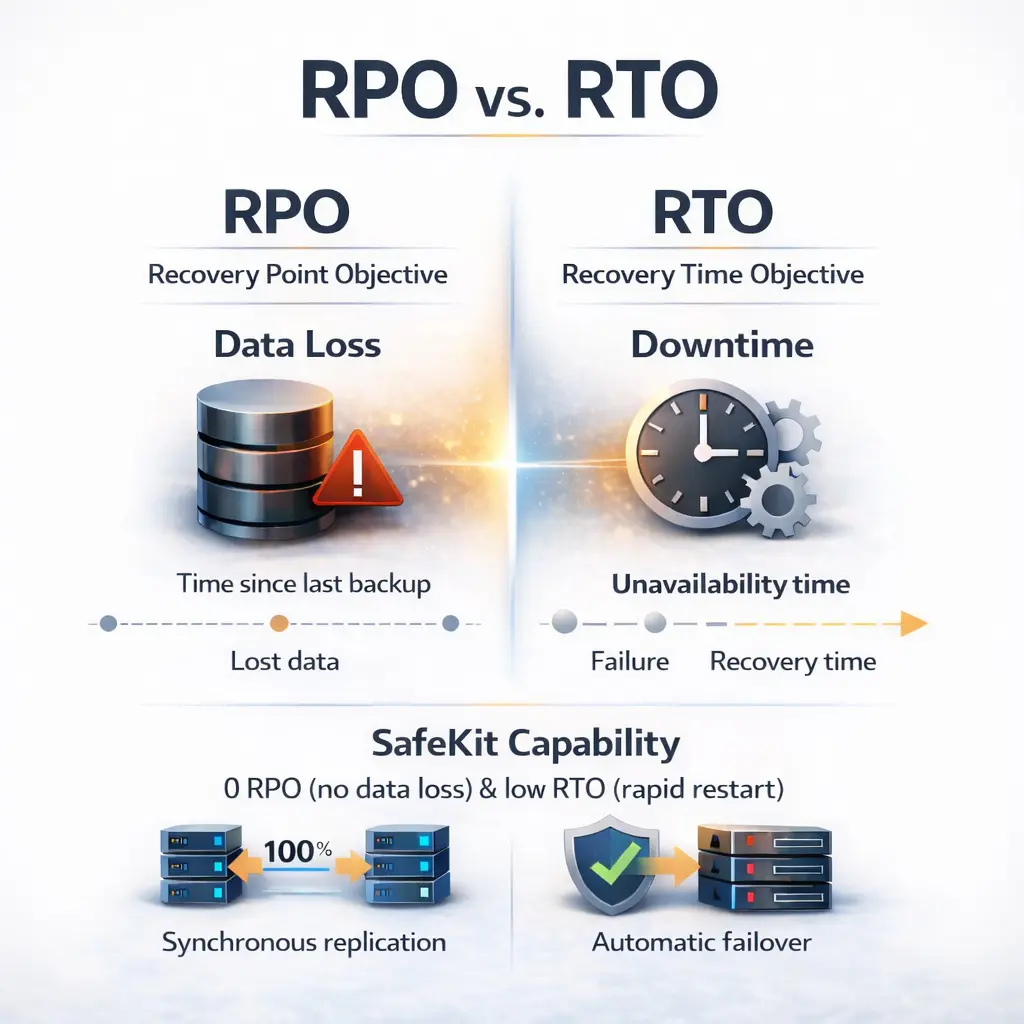
RPO (Recovery Point Objective) reflects the data loss in the event of a failure.

If you are looking for a high availability cluster with automatic failover, then the RPO should be 0. The application is thus restarted without data loss. Either you can choose a hardware high availability cluster with shared disk. Or you can choose a software high availability cluster with synchronous real-time replication to have 0 data loss.

If you are implementing backup solutions, then the RPO is greater than 0 and the recovery is not automatic. Administrators decide how often to replicate and how many backups to keep.

What is RTO?

RTO (Recovery Time Objective) is the time during which an application is unavailable in the event of a failure.

For a critical application, RTO should be minimal. For this, a high availability solution is necessary with automatic restart of the application in the event of hardware or software failures. RTO is then approximatively one minute: the detection time plus the automatic restart time of the application.

With a backup solution, RTO is generally greater than several hours. Administrators will first attempt to repair the hardware and restart the application on up-to-date data. Restarting from a backup is the last decision when previous actions don't work, because it leads to data loss.

RTO with the example of a SafeKit mirror cluster

The SafeKit mirror cluster is a software high availability cluster with synchronous real-time data replication and automatic application failover.

RTO of the SafeKit mirror cluster is in the order of 1 mn and can be decreased if you configure the heartbeat timeout.

For a hardware failure, RTO = heartbeat timeout (default 30 s) + time to restart the application.

For a software failure or an administrator restart, RTO = time to stop the application + time to restart it.

With solutions that reboot a full virtual machine in case of failure, the RTO includes the reboot time of the virtual machine.

RTO with the example of a SafeKit farm cluster

The SafeKit farm cluster is a software high availability cluster with network load balancing and automatic failover.

RTO of a SafeKit farm cluster is in the order of a few seconds.

For a hardware failure, RTO = failure detection timeout through monitoring channels (default a few seconds). After the timeout the load balancing filters are reconfigured.

For a software failure or an administrator restart, RTO = time to stop the application + time to restart it.

RPO with the example of a SafeKit mirror cluster

RPO of the SafeKit mirror cluster is 0 as the replication is synchronous and real-time.

Be careful, with asynchronous replication, RPO is not 0 and there is data loss in case of failure when the application restarts on the secondary server.

RPO with the example of a SafeKit farm cluster

N/R. A farm cluster does replicate any data.

What are the advantages of a mirror cluster?

  • Low Complexity
  • Plug&Play deployment with no specific skills
  • Suitable for large deployments in many sites (very simple to deploy)
  • 2 physical or virtual nodes
  • No shared storage requirement
  • No Domain Controller requirement
  • Same solution on Windows and Linux
  • Support Windows Server and Client OS editions
  • Well documented API and support
  • Synchronous data replication (no data loss in case of failure)
  • Replicated directories can be in the system disk
  • Supports multiple heartbeats and vitual IP addresses
  • Offers configurable software, hardware and network checkers
  • For the split brain problem and the quorum, does not require a special disk or a third machine or a dedicated link between both servers
  • Automatic failover of application with a recovery time in the order of one minute
  • Automatic failback when a server comes back after a failure (no manual operation)
  • A very simple console to deploy the solution and to maintain it afterwards for end-customer
  • Supports hardware and environment failures (20% of causes of unavailability), including the complete failure of a computer room with 2 nodes in two remote sites
  • Supports software failures (40% of causes of unavailability): software bug, regression on software update (N and N+1 versions can coexist)
  • Supports human errors (40% of causes of unavailability) : the simplicity of use avoids the administration error of the critical application

What are the advantages of a farm cluster

  • Low Complexity
  • Plug&Play deployment with no specific skills
  • Suitable for large deployments in many sites (very simple to deploy)
  • 2 physical or virtual nodes or more
  • No network load balancers requirement
  • No proxy server requirement (above the farm cluster)
  • No Domain Controller requirement
  • No restriction in VMware due to multicast or unicast address
  • Same solution on Windows and Linux
  • Support Windows Server and Client OS editions
  • Well documented API and support
  • Supports multiple monitoring channels on multiple networks for server failure detection
  • Supports multiple vitual IP addresses
  • Offers configurable software, hardware and network checkers
  • Offers the mirror cluster with synchronous real-time replication and failover to implement a farm+mirror 3-tiers architecture
  • Automatic failover with a recovery time in the order of a few seconds
  • Automatic failback when a server comes back after a failure (no manual operation)
  • A very simple console to deploy the solution and to maintain it afterwards for end-customer
  • Supports hardware and environment failures (20% of causes of unavailability), including the complete failure of a computer room with 2 nodes in two remote sites
  • Supports software failures (40% of causes of unavailability): software bug, regression on software update (N and N+1 versions can coexist)
  • Supports human errors (40% of causes of unavailability): the simplicity of use avoids the administration error of the critical application

SafeKit High Availability (HA) Solutions: Quick Installation Guides for Windows and Linux Clusters

This table presents the SafeKit High Availability (HA) solutions, categorized by application and operating environment (Databases, Web Servers, VMs, Cloud). Identify the specific pre‑configured .safe module (e.g., mirror.safe, farm.safe, and others) required for real‑time replication, load balancing, and automatic failover of critical business applications on Windows or Linux. Simplify your HA cluster setup with direct links to quick installation guides, each including a download link for the corresponding .safe module.

A SafeKit .safe module is essentially a pre‑configured High Availability (HA) template that defines how a specific application will be clustered and protected by the SafeKit software. In practice, it contains a configuration file (userconfig.xml) and restart scripts.

SafeKit High Availability (HA) Solutions: Quick Installation Guides (with downloadable .safe modules)
Application Category HA Scenario (High Availability) Technology / Product .safe Module Installation Guide
New Applications Real-Time Replication and Failover Windows mirror.safe View Guide: Windows Replication
New Applications Real-Time Replication and Failover Linux mirror.safe View Guide: Linux Replication
New Applications Network Load Balancing and Failover Windows farm.safe View Guide: Windows Load Balancing
New Applications Network Load Balancing and Failover Linux farm.safe View Guide: Linux Load Balancing
Databases Replication and Failover Microsoft SQL Server sqlserver.safe View Guide: SQL Server Cluster
Databases Replication and Failover PostgreSQL postgresql.safe View Guide: PostgreSQL Replication
Databases Replication and Failover MySQL mysql.safe View Guide: MySQL Cluster
Databases Replication and Failover Oracle oracle.safe View Guide: Oracle Failover Cluster
Databases Replication and Failover Firebird firebird.safe View Guide: Firebird HA
Web Servers Load Balancing and Failover Apache apache_farm.safe View Guide: Apache Load Balancing
Web Servers Load Balancing and Failover IIS iis_farm.safe View Guide: IIS Load Balancing
Web Servers Load Balancing and Failover NGINX farm.safe View Guide: NGINX Load Balancing
VMs and Containers Replication and Failover Hyper-V hyperv.safe View Guide: Hyper-V VM Replication
VMs and Containers Replication and Failover KVM kvm.safe View Guide: KVM VM Replication
VMs and Containers Replication and Failover Docker mirror.safe View Guide: Docker Container Failover
VMs and Containers Replication and Failover Podman mirror.safe View Guide: Podman Container Failover
VMs and Containers Replication and Failover Kubernetes K3S k3s.safe View Guide: Kubernetes K3S Replication
AWS Cloud Real-Time Replication and Failover AWS mirror.safe View Guide: AWS Replication Cluster
AWS Cloud Network Load Balancing and Failover AWS farm.safe View Guide: AWS Load Balancing Cluster
GCP Cloud Real-Time Replication and Failover GCP mirror.safe View Guide: GCP Replication Cluster
GCP Cloud Network Load Balancing and Failover GCP farm.safe View Guide: GCP Load Balancing Cluster
Azure Cloud Real-Time Replication and Failover Azure mirror.safe View Guide: Azure Replication Cluster
Azure Cloud Network Load Balancing and Failover Azure farm.safe View Guide: Azure Load Balancing Cluster
Physical Security / VMS Real-Time Replication and Failover Milestone XProtect milestone.safe View Guide: Milestone XProtect Failover
Physical Security / VMS Real-Time Replication and Failover Nedap AEOS nedap.safe View Guide: Nedap AEOS Failover
Physical Security / VMS Real-Time Replication and Failover Genetec (SQL Server) sqlserver.safe View Guide: Genetec SQL Failover
Physical Security / VMS Real-Time Replication and Failover Bosch AMS (Hyper-V) hyperv.safe View Guide: Bosch AMS Hyper-V Failover
Physical Security / VMS Real-Time Replication and Failover Bosch BIS (Hyper-V) hyperv.safe View Guide: Bosch BIS Hyper-V Failover
Physical Security / VMS Real-Time Replication and Failover Bosch BVMS (Hyper-V) hyperv.safe View Guide: Bosch BVMS Hyper-V Failover
Physical Security / VMS Real-Time Replication and Failover Hanwha Vision (Hyper-V) hyperv.safe View Guide: Hanwha Vision Hyper-V Failover
Physical Security / VMS Real-Time Replication and Failover Hanwha Wisenet (Hyper-V) hyperv.safe View Guide: Hanwha Wisenet Hyper-V Failover
Siemens Products Real-Time Replication and Failover Siemens Siveillance suite (Hyper-V) hyperv.safe View Guide: Siemens Siveillance HA
Siemens Products Real-Time Replication and Failover Siemens Desigo CC (Hyper-V) hyperv.safe View Guide: Siemens Desigo CC HA
Siemens Products Real-Time Replication and Failover Siemens Siveillance VMS SiveillanceVMS.safe View Guide: Siemens Siveillance VMS HA
Siemens Products Real-Time Replication and Failover Siemens SiPass (Hyper-V) hyperv.safe View Guide: Siemens SiPass HA
Siemens Products Real-Time Replication and Failover Siemens SIPORT (Hyper-V) hyperv.safe View Guide: Siemens SIPORT HA
Siemens Products Real-Time Replication and Failover Siemens SIMATIC PCS 7 (Hyper-V) hyperv.safe View Guide: SIMATIC PCS 7 HA
Siemens Products Real-Time Replication and Failover Siemens SIMATIC WinCC (Hyper-V) hyperv.safe View Guide: SIMATIC WinCC HA

Comparison of SafeKit with Traditional High Availability (HA) Clusters

How does SafeKit compare to traditional High Availability (HA) cluster solutions?

This comparison highlights the fundamental differences between SafeKit and traditional High Availability (HA) cluster solutions like Failover Clusters, Virtualization HA, and SQL Always-On. SafeKit is designed as a low-complexity, software-only solution for generic application redundancy, contrasting with the high complexity and specific storage requirements (shared storage, SAN) typical of traditional HA mechanisms.
Comparison of SafeKit with traditional High Availability (HA) clusters
Solutions Complexity Comments
Failover Cluster (Microsoft) High Specific Storage (shared storage, SAN)
Virtualization (VMware HA) High Specific Storage (shared storage, SAN, vSAN)
SQL Always-On (Microsoft) High Only SQL is redundant, requires SQL Enterprise Edition
Evidian SafeKit Low Simplest, generic and software-only. Unsuitable for large data replication.

SafeKit's Advantage in Application Redundancy

SafeKit achieves its low-complexity High Availability through a simple, software-based mirroring mechanism that eliminates the need for expensive, dedicated hardware like a SAN (Storage Area Network). This makes it a highly accessible solution for quickly implementing application redundancy without complex infrastructure changes.